·Mergestorm Team·Product
How to build a free website with AI (and keep the code)
Build a free website with AI in one message. Breeze writes the copy and design, puts the site online at a free preview link, saves it as a private GitHub repository you own, and makes every later change a reviewed pull request. A step-by-step guide.
You can build a free website with AI in one message. Most AI website builders stop there: you get a page inside their editor, on their hosting, and the day you need something they did not plan for, you start over.
Breeze does the first part just as fast, then starts you off the way a real software project starts. Your site is a normal TypeScript project, it lives in a private repository in your own GitHub, and every change after the first version is a pull request that gets reviewed before it goes in. The site you make on day one is the same project you can grow into a real app.
This guide walks through it with an example: a website for a coffee cart.
What you need
- A Mergestorm account. Sign up with GitHub, Google, Apple or email. Every account gets 30 free credits every month, no credit card required, and Breeze's work is paid for from those credits.
- Later, for step 3: a free GitHub account. If you do not have one yet, Breeze tells you how to make one and connect it when you get there.
You do not need to write code, pick a template or set up hosting.
Step 1: Describe the website in one message
Open Breeze and say what the site is for, in plain words. Put in the details you already know: names, prices, opening hours, where to find you, the feel you want.
A website for my coffee cart, Little Ember Coffee, in Austin. We sell espresso drinks and pastries at the Saturday farmers market. Show the menu with prices, where to find us, and a way to book the cart for events.
That is the whole brief. You can say more later; you do not need to get it perfect now.
Step 2: Breeze builds it and gives you a free link
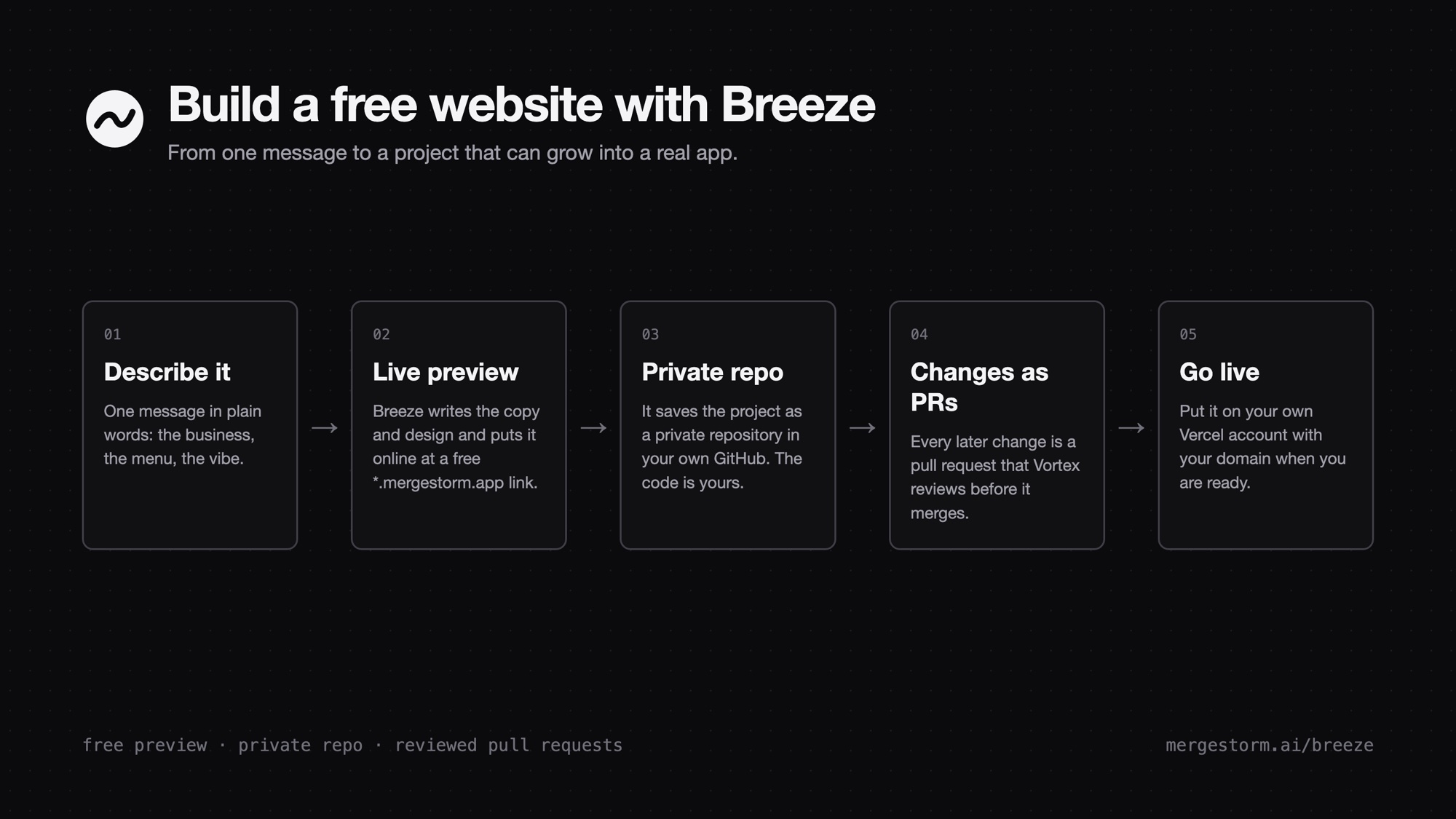
Within seconds Breeze writes the copy, picks colors and fonts, and shows the page beside the chat. It also puts the site online at its own address, such as little-ember.mergestorm.app, so you can open it on your phone or send it to a friend.
Under the hood this is not a page frozen inside an editor. Breeze writes a real TypeScript project (Vite, ESLint, and an AGENTS.md file that tells any coding agent how the project works). From now on it is your project, not a template.
Ask for changes in the same chat:
Make the menu two columns and add oat milk for 75 cents extra.
Breeze edits the project and publishes the new version at the same address.
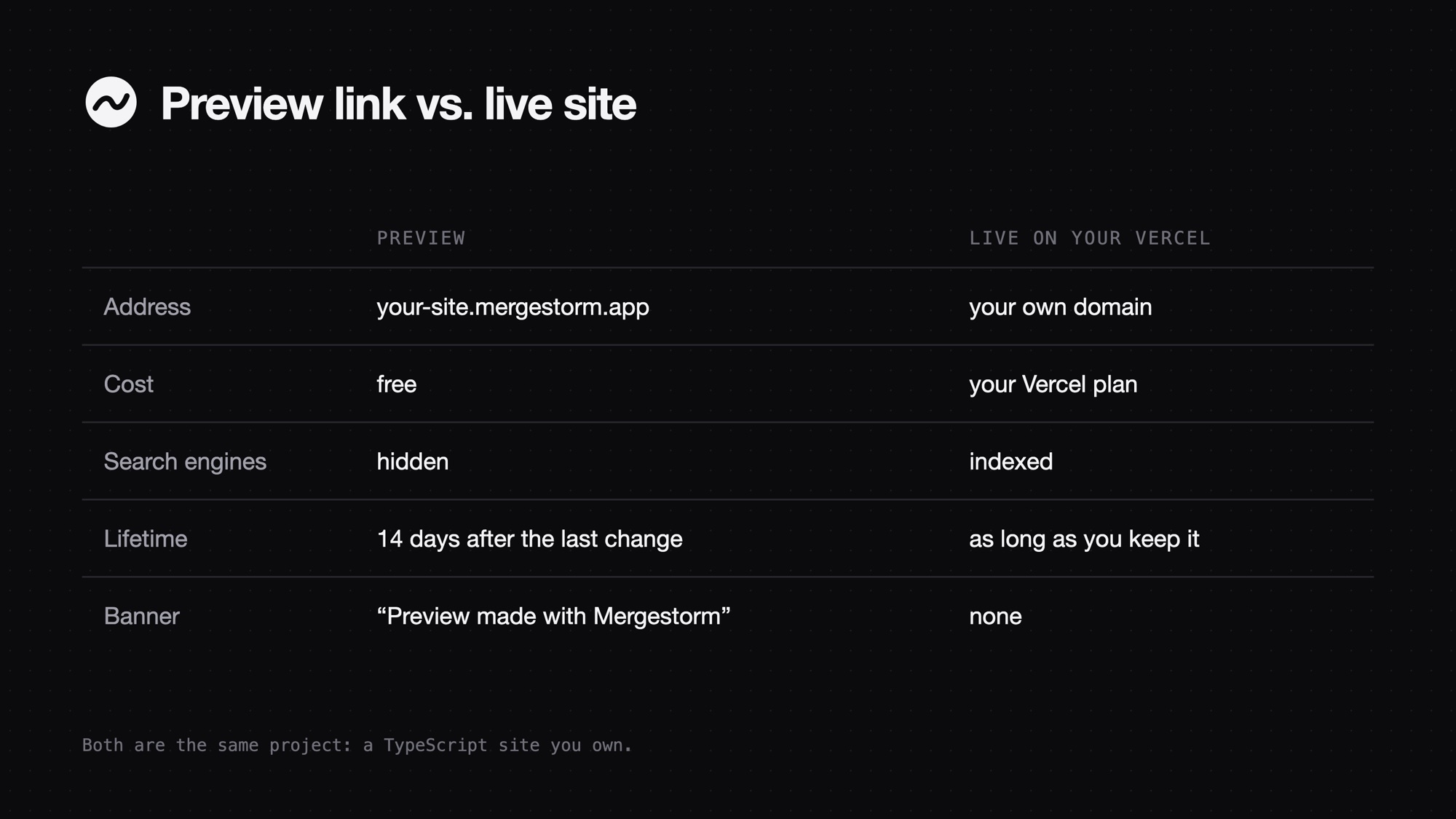
The free link is a preview. It carries a small "Preview made with Mergestorm" bar, search engines do not index it, and it goes offline 14 days after its last change unless you change it again. Step 5 covers making it permanent.
Step 3: Save it as a private GitHub repository
Once the site works, Breeze offers to save it as a private repository in your own GitHub. Say yes, and it creates the repository and pushes the whole project as the first commit.
Why this matters:
- The code is yours. It sits in your GitHub account, not ours. You can download it, move it, or hand it to a developer any time.
- Private by default. Nobody sees it unless you share it. If you want it public, ask Breeze or flip it in GitHub.
- It is ready to grow. A repository is how every serious software project is kept. Booking forms, a shop, a login, a database: they all start from here.
If you have no GitHub account yet, create one at github.com (it is free and private repositories are free), connect it to Mergestorm when Breeze asks, and carry on in the same chat.
Step 4: Make every change a pull request
After the project is in a repository, Breeze stops editing it directly. Each change you ask for becomes a pull request: a proposed change with a description of what changed and why, which you can look at before it goes in.
Add a page with photos from our last three events.
Breeze makes the change on a branch and opens the pull request. Once Vortex, Mergestorm's code reviewer, is connected to the repository, it checks each pull request for mistakes; Breeze shows you how to connect it if it is not yet. You get a clear record of every change, a review on every one once Vortex is connected, and an easy way back if you change your mind.
If you ask Breeze why it works this way, the answer is simple: it is how good software teams work. Every change is reviewed, nothing breaks the live site by surprise, and your project stays in shape to become a real product rather than a page you will have to rebuild.
Step 5: Put it live on your own domain
When you are ready for a permanent site, ask Breeze to deploy it. It puts the project on your own Vercel account and gives you the live address; connect your domain in Vercel and you are done. There is no preview bar, search engines can find it, and it stays up as long as you keep it.
Vercel's free Hobby plan covers personal, non-commercial sites. A site for a business belongs on Vercel's paid plan; check Vercel's pricing for the current terms.
Why start this way
Building a free website with AI is easy now. What most builders skip is what comes after: who owns the code, where it lives, and how it changes without breaking. Breeze answers those on day one:
| Typical AI website builder | Breeze | |
|---|---|---|
| First version | One prompt | One prompt |
| Where the code lives | Inside the builder | A private repository in your GitHub |
| What you get | A page in their editor | A TypeScript project (Vite, ESLint, AGENTS.md) |
| How changes happen | Edited in place | Pull requests, each one reviewed |
| Where it runs | Their hosting | Free preview link, then your own Vercel |
You still get the speed. You also get a project that a developer, or Breeze itself, can keep building on for years.
Try it
Open Breeze, describe your site in one message, and you will have a free link to share in under a minute. When it looks right, say yes to the private repository, and your next change will arrive as a pull request.